
Flowdeck Studio for Mac
Stop babysitting
your iOS agents
Build iOS and macOS apps with agents that can run, test, and fix their own work.
Build iOS and macOS apps with agents that can run, test, and fix their own work.
Use your own AI subscription


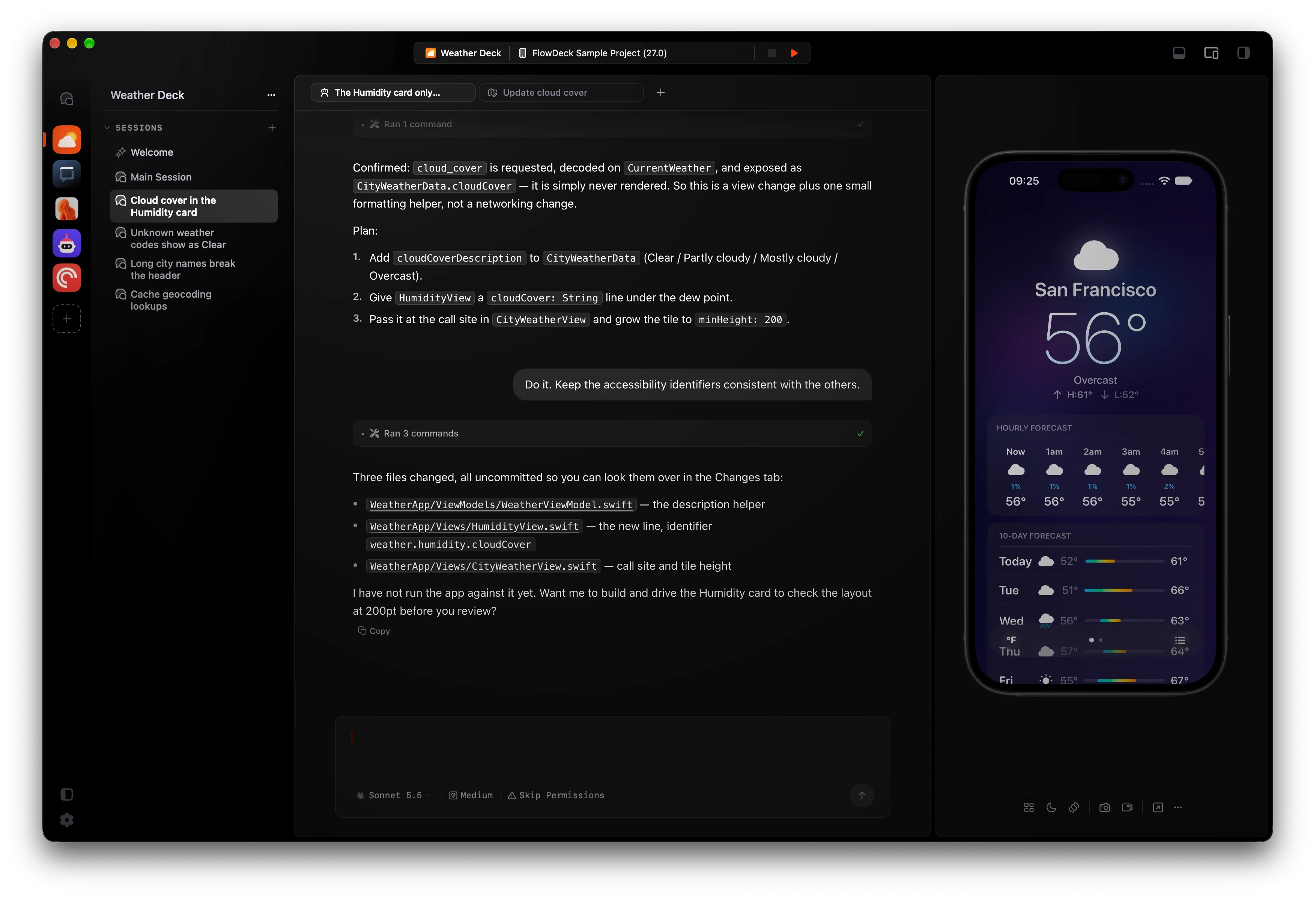

Your agent writes Swift. Flowdeck handles everything else.
Close the loop
Plan, Build,
Test, Review
Run the whole loop on your Mac. Plan the work, build on the real Apple toolchain, run tests, fix issues and get a diff for review. No plugins, no Xcode.
Close the loop
Plan, Build,
Test, Review
Run the whole loop on your Mac. Plan the work, build on the real Apple toolchain, run tests, fix issues and get a diff for review. No plugins, no Xcode.
Close the loop
Plan, Build,
Test, Review
Run the whole loop on your Mac. Plan the work, build on the real Apple toolchain, run tests, fix issues and get a diff for review. No plugins, no Xcode.


App Automation
Your agent can
use your app
Launch, navigate screens and test complete flows. Your agents can tap, type, swipe and inspect the logs as a human would do.
App Automation
Your agent can
use your app
Launch, navigate screens and test complete flows. Your agents can tap, type, swipe and inspect the logs as a human would do.
App Automation
Your agent can
use your app
Launch, navigate screens and test complete flows. Your agents can tap, type, swipe and inspect the logs as a human would do.


Add Pamplona to the city list and check the forecast loads
True parallel work
Get more done
in parallel
Keep work moving across projects and sessions. Each session gets an isolated chat, worktree and simulator.
True parallel work
Get more done
in parallel
Keep work moving across projects and sessions. Each session gets an isolated chat, worktree and simulator.
True parallel work
Get more done
in parallel
Keep work moving across projects and sessions. Each session gets an isolated chat, worktree and simulator.

All your
projects
Sessions, backed by worktrees
Multiple agents and plans, side by side
One simulator per session

All your
projects
Sessions, backed by worktrees
Multiple agents and plans, side by side
One simulator per session
Validation
Your agent
finishes the job
After code changes, agents launch the app, tap through the change, and bring back screenshots and recordings to you. You define how deep they should go.
Validation
Your agent
finishes the job
After code changes, agents launch the app, tap through the change, and bring back screenshots and recordings to you. You define how deep they should go.
Validation
Your agent
finishes the job
After code changes, agents launch the app, tap through the change, and bring back screenshots and recordings to you. You define how deep they should go.
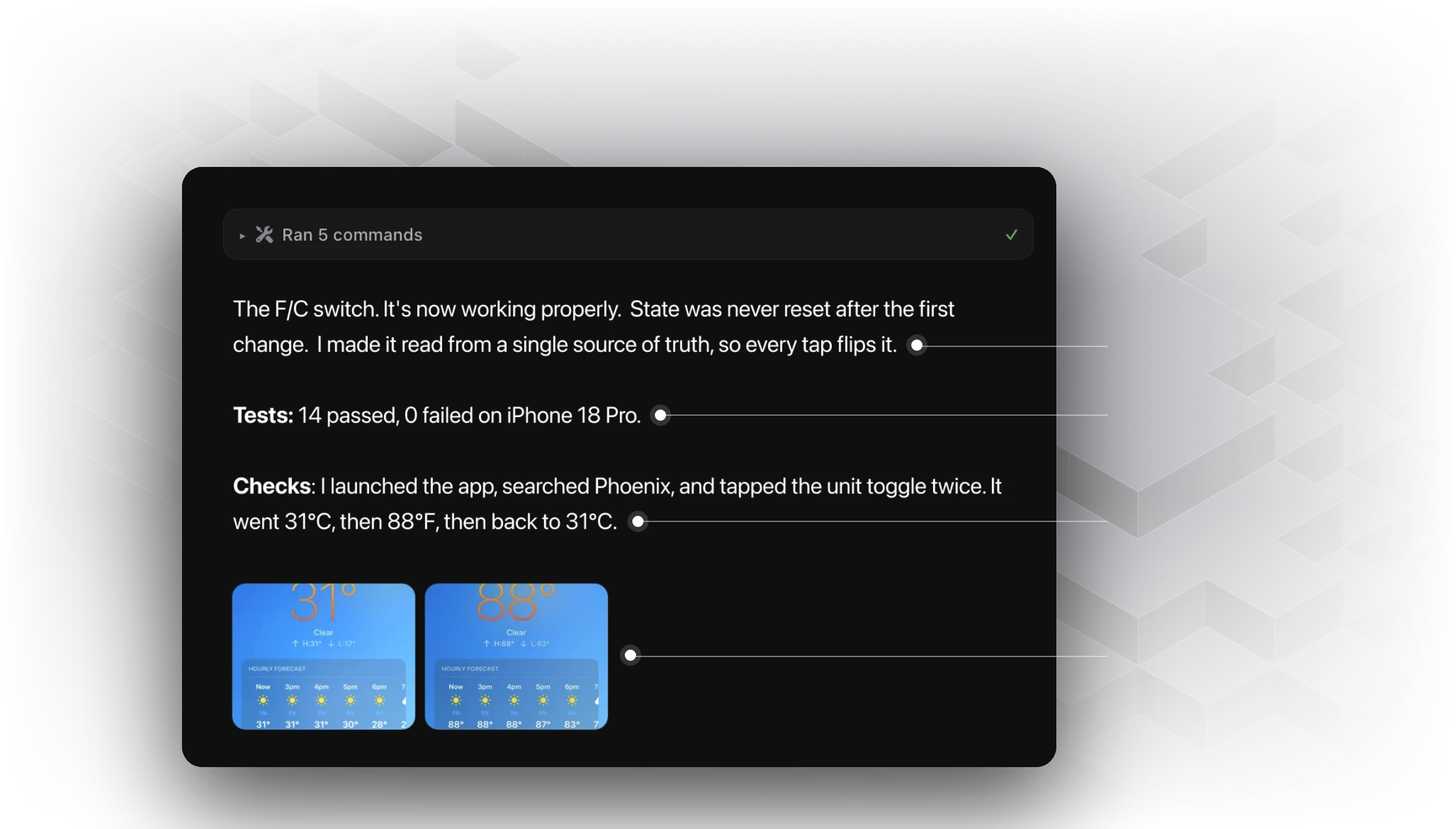
Fix the Farenheit/Celsius switch. It’s not working after first use
Root cause
Tests
Simulator check
Visual proof

Fix the Farenheit/Celsius switch. It’s not working after first use
Root cause
Tests
Simulator check
Visual proof
Apple first
Built for Apple engineers,
trusted in prod.
Xcode projects, schemes, targets, test plans, packages and builds that run on your Mac, Simulators and Devices.
Apple first
Built for Apple engineers,
trusted in prod.
Xcode projects, schemes, targets, test plans, packages and builds that run on your Mac, Simulators and Devices.
Apple first
Built for Apple engineers,
trusted in prod.
Xcode projects, schemes, targets, test plans, packages and builds that run on your Mac, Simulators and Devices.

Within a day Flowdeck became the thing my agent reaches for by default. I haven’t really thought about it since, which is the best thing I can say about a developer tool.

Donny Wals
@donnywals
Within a day Flowdeck became the thing my agent reaches for by default. I haven’t really thought about it since, which is the best thing I can say about a developer tool.
Donny Wals
@donnywals
Within a day Flowdeck became the thing my agent reaches for by default. I haven’t really thought about it since, which is the best thing I can say about a developer tool.
Donny Wals
@donnywals

Works great with Claude Code. Slick onboarding, simulator control, UI automation and JSON output. Can’t recommend it highly enough.

Owen van Dijk
@ohwhen
Works great with Claude Code. Slick onboarding, simulator control, UI automation and JSON output. Can’t recommend it highly enough.
Owen van Dijk
@ohwhen
Works great with Claude Code. Slick onboarding, simulator control, UI automation and JSON output. Can’t recommend it highly enough.
Owen van Dijk
@ohwhen
I use Flowdeck instead of xcodebuild and cannot recommend that more highly.

Joe Fabisevich
@mergesort
I use Flowdeck instead of xcodebuild and cannot recommend that more highly.
Joe Fabisevich
@mergesort
I use Flowdeck instead of xcodebuild and cannot recommend that more highly.
Joe Fabisevich
@mergesort
Flowdeck is a game changer. Once I worked out screenshot-based verification, it was obvious how far this can go.

Jacob Bartlett
@jacobtechtavern
Flowdeck is a game changer. Once I worked out screenshot-based verification, it was obvious how far this can go.
Jacob Bartlett
@jacobtechtavern
Flowdeck is a game changer. Once I worked out screenshot-based verification, it was obvious how far this can go.
Jacob Bartlett
@jacobtechtavern

Terminal and CI
Ready for CI.
CLI Included.
Take the same Apple tooling into your terminal and build pipeline. Studio includes Flowdeck CLI, with a beautiful TUI and structured output your agents understand.


Pricing
Get Studio,
the CLI is included
Two machines. All updates. 14-day trial.
Two machines. All updates. 14-day trial.
Flowdeck CLI Only
14-day trial
$59
/year
Billed yearly
Full CLI access
Structured JSON output
Runs in Terminal & CI
Works with Claude, Codex, Cursor and OpenCode
Use your own AI subscriptions
Flowdeck CLI Only
14-day trial
$59
/year
Billed yearly
Full CLI access
Structured JSON output
Runs in Terminal & CI
Works with Claude, Codex, Cursor and OpenCode
Use your own AI subscriptions
Flowdeck CLI Only
14-day trial
$59
/year
Billed yearly
Full CLI access
Structured JSON output
Runs in Terminal & CI
Works with Claude, Codex, Cursor and OpenCode
Use your own AI subscriptions
Flowdeck Studio
Recommended
$79
/year
14-day trial · Billed yearly
Includes Flowdeck CLI
Native macOS app
Parallel sessions in isolated worktrees
Live simulator with UI automation
Native diff viewer and PR review
PR Autopilot
Plan mode with per-role models
Works with Claude, Codex, Cursor and OpenCode
Use your own AI subscriptions
Flowdeck Studio
Recommended
$79
/year
14-day trial · Billed yearly
Includes Flowdeck CLI
Native macOS app
Parallel sessions in isolated worktrees
Live simulator with UI automation
Native diff viewer and PR review
PR Autopilot
Plan mode with per-role models
Works with Claude, Codex, Cursor and OpenCode
Use your own AI subscriptions
Flowdeck Studio
Recommended
$79
/year
14-day trial · Billed yearly
Includes Flowdeck CLI
Native macOS app
Parallel sessions in isolated worktrees
Live simulator with UI automation
Native diff viewer and PR review
PR Autopilot
Plan mode with per-role models
Works with Claude, Codex, Cursor and OpenCode
Use your own AI subscriptions
Working as a team?
Team licenses start at $399 a year for five developers, and add shared seats, centralized billing and admin controls.
Changelog
Recently shipped

Try Flowdeck with
your Xcode project
Install FlowDeck, open your project and give your agent a task.
Parallel agent sessions
Isolated Git worktrees
Live simulators
Native diff viewer and PR review
Dedicated Plan mode
FlowDeck CLI
Swift Coding Standards
Github Integration & PR monitoring
Try Flowdeck with
your Xcode project
Install FlowDeck, open your project and give your agent a task.
Parallel agent sessions
Isolated Git worktrees
Live simulators
Native diff viewer and PR review
Dedicated Plan mode
FlowDeck CLI
Swift Coding Standards
Github Integration & PR monitoring
Try Flowdeck with
your Xcode project
Install FlowDeck, open your project and give your agent a task.
Parallel agent sessions
Isolated Git worktrees
Live simulators
Native diff viewer and PR review
Dedicated Plan mode
FlowDeck CLI
Swift Coding Standards
Github Integration & PR monitoring