Every guide on using Claude Code or Codex for iOS development hits the same wall. The agent writes code. Now it needs to build, run, see errors, check the screen, read the logs. On the web, that loop is trivial. On iOS, it’s an archaeological dig through Apple’s fragmented CLI tools.
xcodebuild compiles. simctl manages simulators. devicectl handles physical devices. log stream captures output. Each has its own flags, its own output format, its own failure modes. Building and running an app on a simulator means orchestrating three or four of them in sequence, then parsing output that was never designed for machines.
That’s the starting point. What follows is three approaches to solving it, with honest tradeoffs for each.
1. Raw shell with CLAUDE.md
The simplest approach. No dependencies beyond Apple’s own tools. Document your build commands, simulator UDIDs, binary paths, and bundle identifiers in your CLAUDE.md file. The agent runs xcodebuild, pipes through xcsift for structured errors, then handles simctl install and simctl launch separately.
This twocentstudios walkthrough is the best reference out there. Five steps, clearly documented, battle-tested with Opus.
Good at: Zero cost. No third-party runtime. Full control over every flag and every step. Nothing between you and Apple’s tools. Works with any agent, any editor, any CI system.
Costs you: Token budget. xcodebuild output is hundreds of lines of noise per build. xcsift helps, but the agent still manages UDIDs, binary paths, destination strings, and multi-step orchestration across every turn. Every new session rediscovers the same information. No real-time log streaming. No UI automation. No screenshots unless you add more scripts.
Sentry benchmarked this approach (shell_primed scenario):
- 99.56% task success
- 123s median time per task
- ~341K tokens per task
- $0.98 cost per task
Watch out for: Destination strings that break across Xcode versions. Agents that get frustrated and nuke DerivedData. Output format changes invalidating your parsing. A growing pile of shell documentation in CLAUDE.md that drifts from reality.
2. XcodeBuildMCP
An MCP server and CLI that wraps xcodebuild, simctl, and related tools into structured tool calls. The agent calls build_sim and gets back JSON with categorized errors, warnings, and file locations instead of raw build logs. Acquired by Sentry. Large community, actively maintained, free and open source.
Good at: Structured output without building your own parsing layer. The agent calls tools with clear parameters and gets predictable responses. Works with Claude Code, Cursor, Windsurf, and Xcode 26.3’s native MCP support. Has UI automation through a bundled AXe binary. Active development with frequent releases.
Costs you: Complexity. XcodeBuildMCP ships 76 tools across 14 workflow groups. That’s the same tool sprawl problem it was supposed to solve, just wrapped in MCP instead of shell scripts. The CLI mirrors this complexity: xcodebuildmcp simulator build-and-run is not meaningfully simpler than the xcodebuild + simctl dance it replaces. You traded one set of tools for another.
MCP responses are capped at 25,000 tokens. Build logs, test output, anything verbose gets truncated. When the agent needs full output, you’re back to running raw xcodebuild through shell anyway. The structured interface becomes a partial view of what actually happened.
Token overhead compounds from the other direction too. 76 tool schemas loaded into context means the model carries all of them through every turn. Dynamic tool loading (XCODEBUILDMCP_DYNAMIC_TOOLS) reduces upfront cost but adds latency on every discovery step.
Sentry’s own benchmark numbers (XcodeBuildMCP v2):
- 100% task success
- 147s median time per task (+20% vs shell)
- ~453K tokens per task (+33% vs shell)
- $1.27 cost per task (+30% vs shell)
(Side-by-side comparison of all three approaches)
Requires Node.js 18+ on a machine building native Swift. Homebrew install bundles it, but it’s still a Node.js process running alongside your builds. No real-time OSLog streaming. UI automation is handled by a separate bundled binary, not the core tool. No interactive mode for human developers. It’s an agent tool that humans can also invoke, not something you’d want to work in directly.
Watch out for: Telemetry. XcodeBuildMCP ships with @sentry/node as a runtime dependency. initSentry() runs on every CLI and MCP startup by default. Error events, stack traces, and in some cases file paths are sent to Sentry’s servers. Opt-out exists (XCODEBUILDMCP_SENTRY_DISABLED=true), but it’s in docs/PRIVACY.md, not the README. Sentry is a data company. Their business model is observability. That doesn’t mean they’re doing anything wrong, but you should know what’s running on your machine before you install it. Full privacy comparison here.
3. FlowDeck CLI
A native Swift CLI that collapses the multi-tool dance into eight verbs: build, run, test, clean, logs, stop, context, init. No MCP server. No tool discovery. No Node.js. No token cap on output. The agent calls commands directly and gets back versioned NDJSON.
flowdeck run -S "iPhone 16" --json
flowdeck logs <app-id>
flowdeck ui simulator screen --json
Three commands. Build, launch, attach to logs, capture the screen. Same build system under the hood (xcodebuild, same schemes, same signing), but the interface is designed for agents and humans to share.
Good at: Everything. Speed, token efficiency, human ergonomics, and a feedback loop that actually closes all the way.
FlowDeck on the same Sentry eval harness (March 2026, n=200):
- 100% task success
- 60.4s median time per task (-51% vs shell)
- ~82.5K tokens per task (-76% vs XcodeBuildMCP)
- $0.12 cost per task (-88% vs XcodeBuildMCP)
- 0 direct calls to
xcodebuildorxcrunacross all 200 runs
(Full benchmark table and methodology)
Real-time OSLog streaming from simulators and macOS apps. The agent sees print() statements and Logger output as it happens, not after the session, not truncated at 25K tokens. Just flowdeck logs <app-id>.
UI automation is built into the core CLI. Tap, swipe, pinch, scroll, screenshot, accessibility tree, all with structured JSON output. Not a separate binary bolted on. The agent can see the screen, interact with it, and verify results without human intervention.
Full macOS and multi-platform support. flowdeck run -D "My Mac" builds and launches native Mac apps with the same commands, same JSON output, same log streaming. iOS, macOS, watchOS, tvOS, visionOS. Not just iOS simulators.
Interactive mode: the human side
The other two approaches are agent-first tools that humans tolerate. FlowDeck is the opposite: a development environment that agents also happen to be great at.
Run flowdeck -i from your project directory and you get a full terminal UI. Single keystrokes: B to build, R to run, U to test, L to toggle live logs, K to clean, X to stop the app. Scheme selection, simulator management, runtime installs, Swift package operations, all without leaving the terminal.
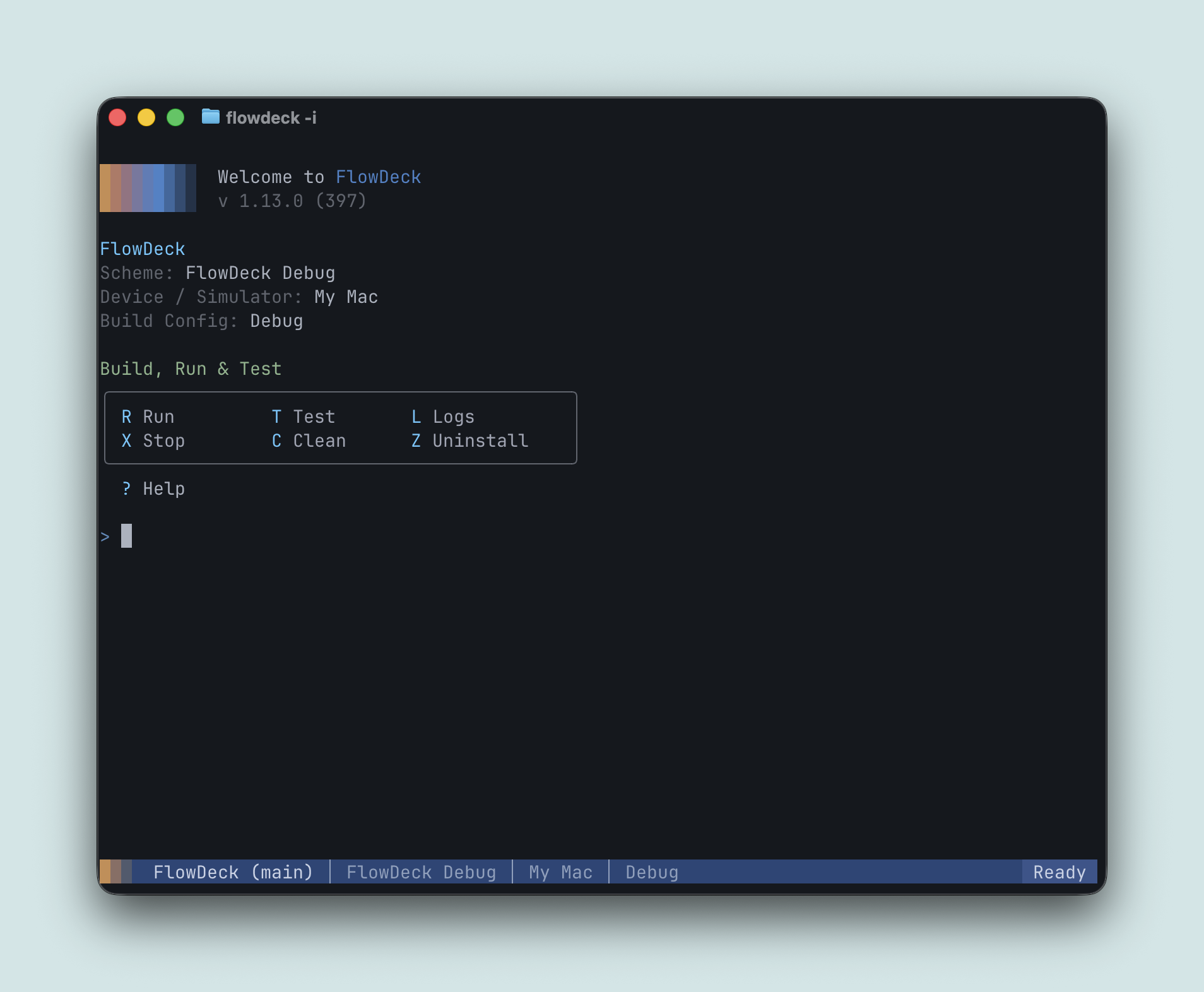
This is the part the other tools don’t have. When the agent finishes a task and hands control back to you, you don’t switch to Xcode. You don’t open a different tool. You stay in FlowDeck. Same tool the agent was just using, same project state, zero context switch.
Agent integration without MCP overhead
Integrates with Claude Code, Codex, and OpenCode through skills and plugins instead of MCP. Zero tokens loaded into context at startup. The agent reads a skill file when relevant, not on every turn. No protocol layer, no tool discovery step, no 25K response cap.
Also ships a free VS Code/Cursor extension with full LLDB debugging, SourceKit-LSP, and Test Explorer integration. One tool for the entire team: agents and humans, terminal and editor.
No telemetry. No crash reporter. No SDK. No data pipeline. License check on activation and nothing else. Your code, your builds, your machine. Nothing leaves.
Costs you: $59/year. Not open source. The eight-verb surface is opinionated. Niche xcodebuild flags go through --xcodebuild-options rather than being first-class commands. No MCP server means agents that assume MCP infrastructure need the skill/plugin pattern instead. Smaller community than XcodeBuildMCP.
Watch out for: Vendor dependency on a commercial product. If FlowDeck goes away, your agent setup goes with it. The comparison page addresses longevity directly (paying customers sustain a business; open source projects get abandoned when the maintainer moves on), but it’s a real consideration.
Choosing
All three approaches close the loop. The differences are in what you spend to get there and what you get back.
If you want free and maximum control, raw shell with a good CLAUDE.md is proven. Accept the token cost and the maintenance burden.
If you want structured output at no cost and don’t mind the complexity, XcodeBuildMCP is the most adopted solution. Disable the telemetry. Accept the 76-tool context load and the 25K token cap on responses.
If you want the fastest loop, the lowest token cost, real-time logs, built-in automation, an interactive development environment, and zero telemetry, FlowDeck is what serious teams use to ship. $59/year. Seven-day free trial.
curl -sSL https://flowdeck.studio/install.sh | sh
The eval is open source. See FlowDeck in action. Or read the full comparison.
Ship the app.
Daniel Bernal, @afterxleep